JWT토큰을 활용하는 방법
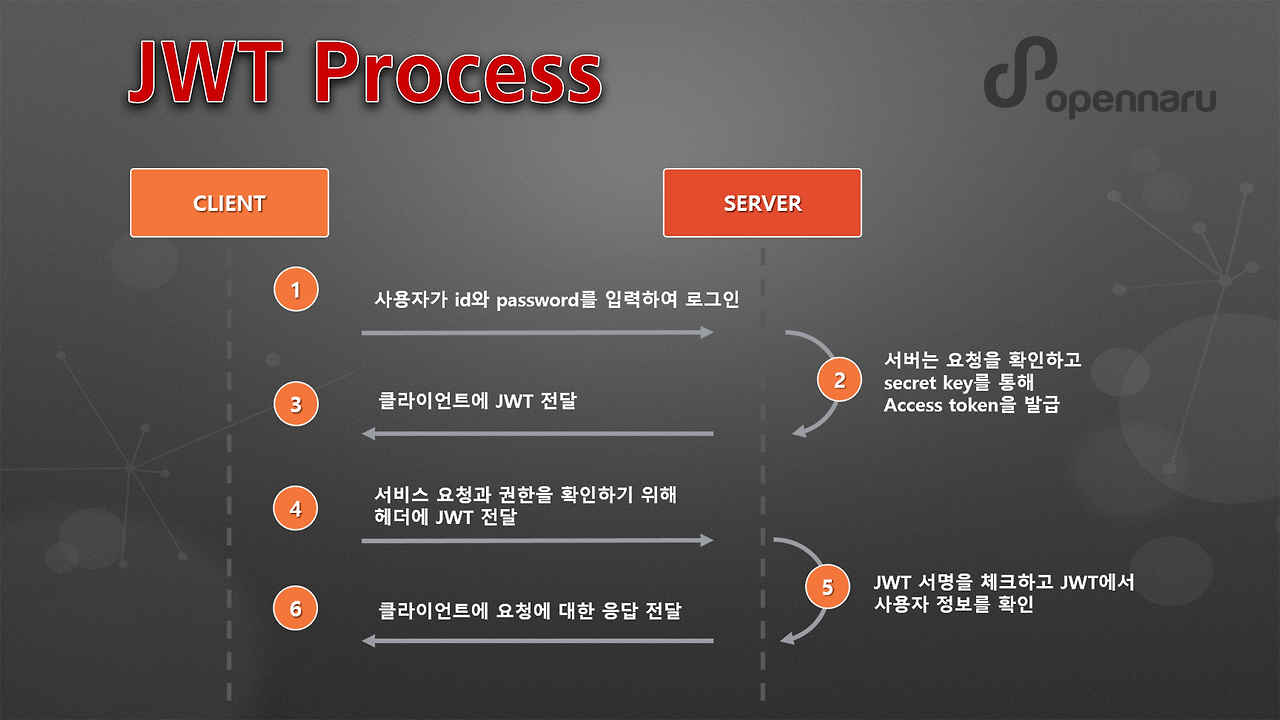
이전 포스팅에서는 사용자가 로그인에 성공했을 때 JWT 토큰을 발급하는 과정에 대해 다뤘다. 하지만 실제 서비스에서는 단순 발급만으로는 충분하지 않다. 클라이언트가 발급받은 토큰을 서버 요청과 함께 전달하면, 서버는 이를 기반으로 사용자가 해당 API를 호출할 권한이 있는지 판단할 수 있다. 이번 포스트에서는 JWT 토큰을 활용한 인증(Authentication)과 인가(Authorization) 과정을 NestJS를 중심으로 살펴보고, 실제 API 요청에서 어떻게 안전하게 권한을 확인할 수 있는지 테스트 해보자. 이전 과정은 3번까지 였다면 이번에 하는 과정은 4번부터 6번까지이다. 헷갈리지 말자.
인증 가드 구현하기 부분 공식사이트를 잘 확인해보자. 모든 개발 과정은 공식사이트를 기준으로 따라간다.
https://docs.nestjs.com/security/authentication#implementing-the-authentication-guard
auth guard 생성하기
nest g guard auth/auth --flat생성하고 공식문서 인증 가드 구현에 있는 하단의 코드를 붙여넣어주자.
private extractTokenFromHeader(request: Request): string | undefined {
  const [type, token] = request.headers.authorization?.split(' ') ?? [];
  return type === 'Bearer' ? token : undefined;
}
이 코드는 Request 객체를 받아 헤더에 있는 Authorization 값을 확인한다.
옵셔널 체이닝 ?. 이 사용되어, request.headers.authorization이 존재하지 않으면 undefined을 반환한다.
이 경우 split() 은 호출되지 않고, 결과도 undefined가 된다.
만약 undefined 이 반환되면, 배열 구조 분해 [type, token]을 시도할 때 오류가 날 수 있다.
이를 방지하기 위해 ?? [] 를 사용하여, 왼쪽 값이 null 또는 undefined일 경우 빈 배열로 초기화한다.
결과적으로 배열에 값이 없으면 type과 token에는 undefined로 할당된다.
이까지 완료되었다면 완성코드를 한번보자. 공식문서에 있는 그대로의 코드이다.
import {
  CanActivate,
  ExecutionContext,
  Injectable,
  UnauthorizedException,
} from '@nestjs/common';
import { JwtService } from '@nestjs/jwt';
import { Request } from 'express';
import { jwtConstants } from './constants';

@Injectable()
export class AuthGuard implements CanActivate {
  constructor(private readonly jwtService: JwtService) {}
  async canActivate(context: ExecutionContext): Promise<boolean> {
    const request = context.switchToHttp().getRequest();
    const token = this.extractTokenFromHeader(request);
    if (!token) {
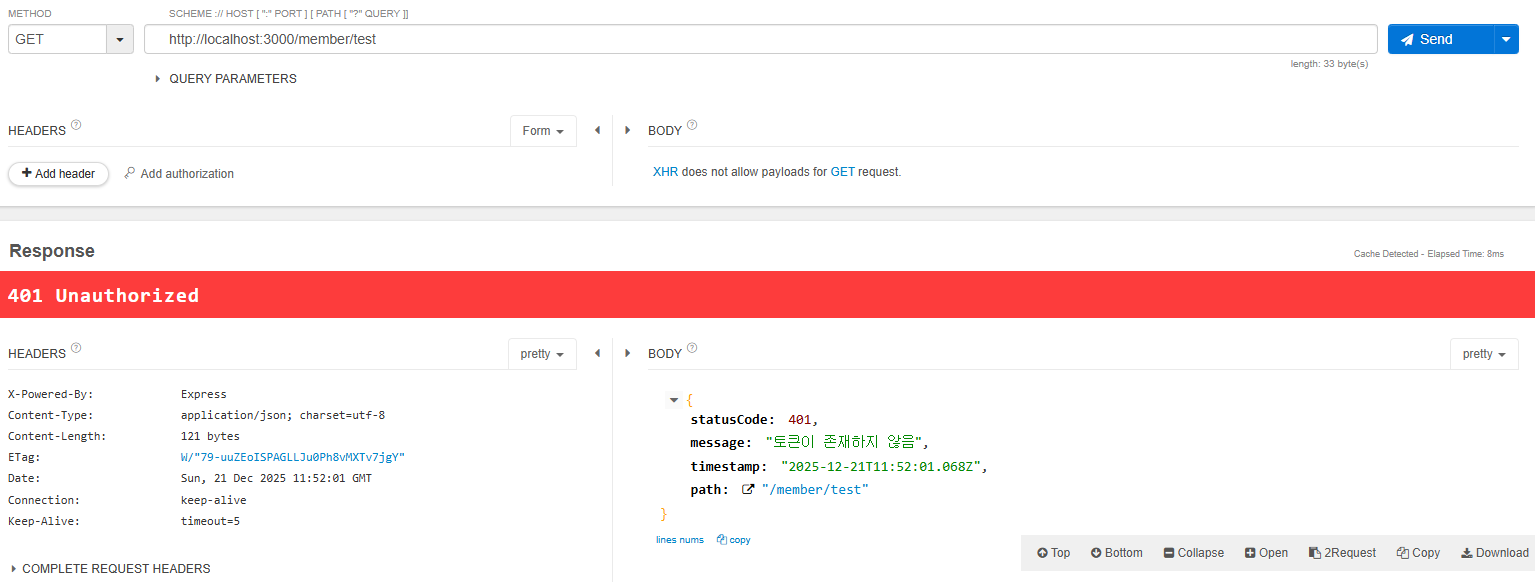
      throw new UnauthorizedException('토큰이 존재하지 않음');
    }
    try {
      const payload = await this.jwtService.verifyAsync(token, {
        secret: jwtConstants.secret,
      });
      // 💡 We're assigning the payload to the request object here
      // so that we can access it in our route handlers
      request['user'] = payload;
    } catch {
      throw new UnauthorizedException('토큰 검증 실패');
    }
    return true;
  }
  private extractTokenFromHeader(request: Request): string | undefined {
    const [type, token] = request.headers.authorization?.split(' ') ?? [];
    return type === 'Bearer' ? token : undefined;
  }
}- 토큰이 존재하지 않으면 즉시 에러가 발생한다.
- JWT 검증 과정에서 예외가 발생할 수 있기 때문에, 검증은 try-catch 블록 안에서 수행한다.
- 검증에 성공하면 payload를 request['user']에 저장하여, 이후 컨트롤러나 미들웨어에서 req.user로 쉽게 접근할 수 있다.
- 검증에 실패하면 UnauthorizedException이 발생한다.
- 마지막까지 통과하면 Guard는 true를 반환하여 요청을 허용한다.
테스트하기
  @UseGuards(AuthGuard)
  @Get('test')
  test() {
    return 'token ok';
  }
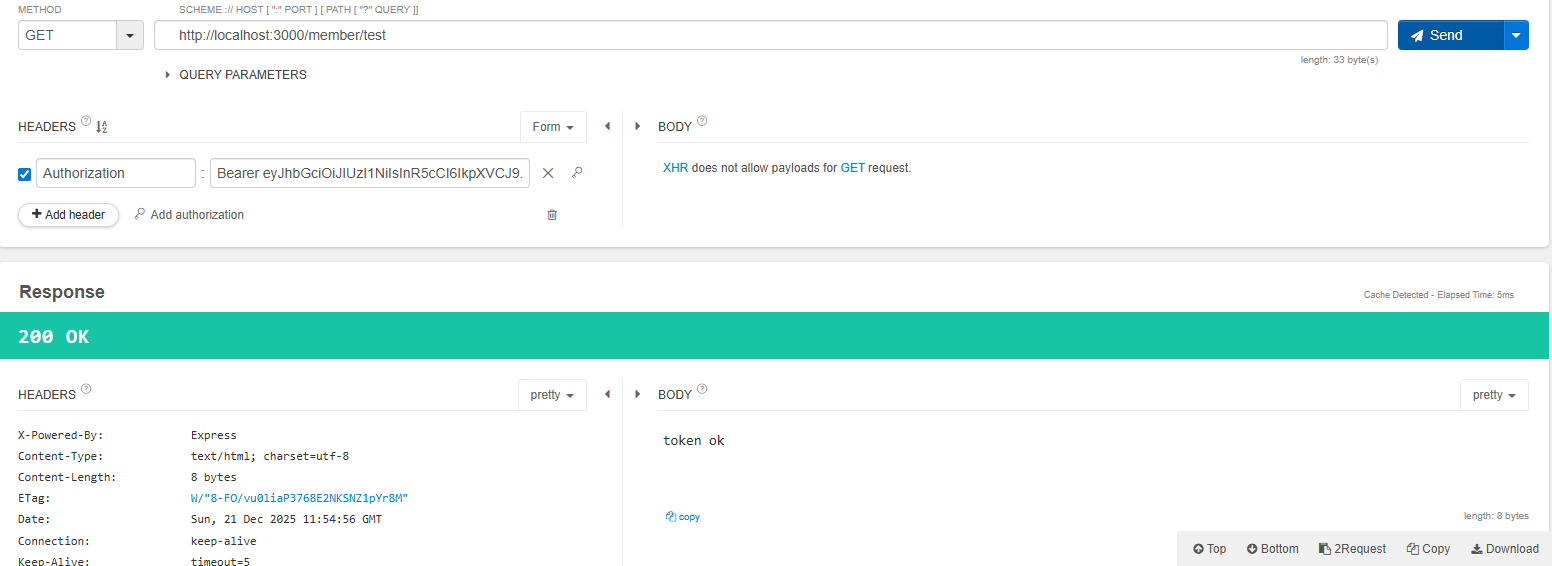
참고
https://docs.nestjs.com/security/authentication#authentication
Documentation | NestJS - A progressive Node.js framework
Nest is a framework for building efficient, scalable Node.js server-side applications. It uses progressive JavaScript, is built with TypeScript and combines elements of OOP (Object Oriented Programming), FP (Functional Programming), and FRP (Functional Rea
docs.nestjs.com
'NestJS > 개발' 카테고리의 다른 글
| Redis/BullMQ 이용하여 연산 작업 따로하기 (0) | 2025.12.23 |
|---|---|
| JWT - Passport 사용하기 (0) | 2025.12.22 |
| JWT - 역할 기반 관리하기 (1) | 2025.12.21 |
| JWT - 로그인 후 발급하기 (1) | 2025.12.21 |
| NestJS + Prisma 연결하기 - (공식 문서를 잘 확인하자...) (0) | 2025.12.20 |